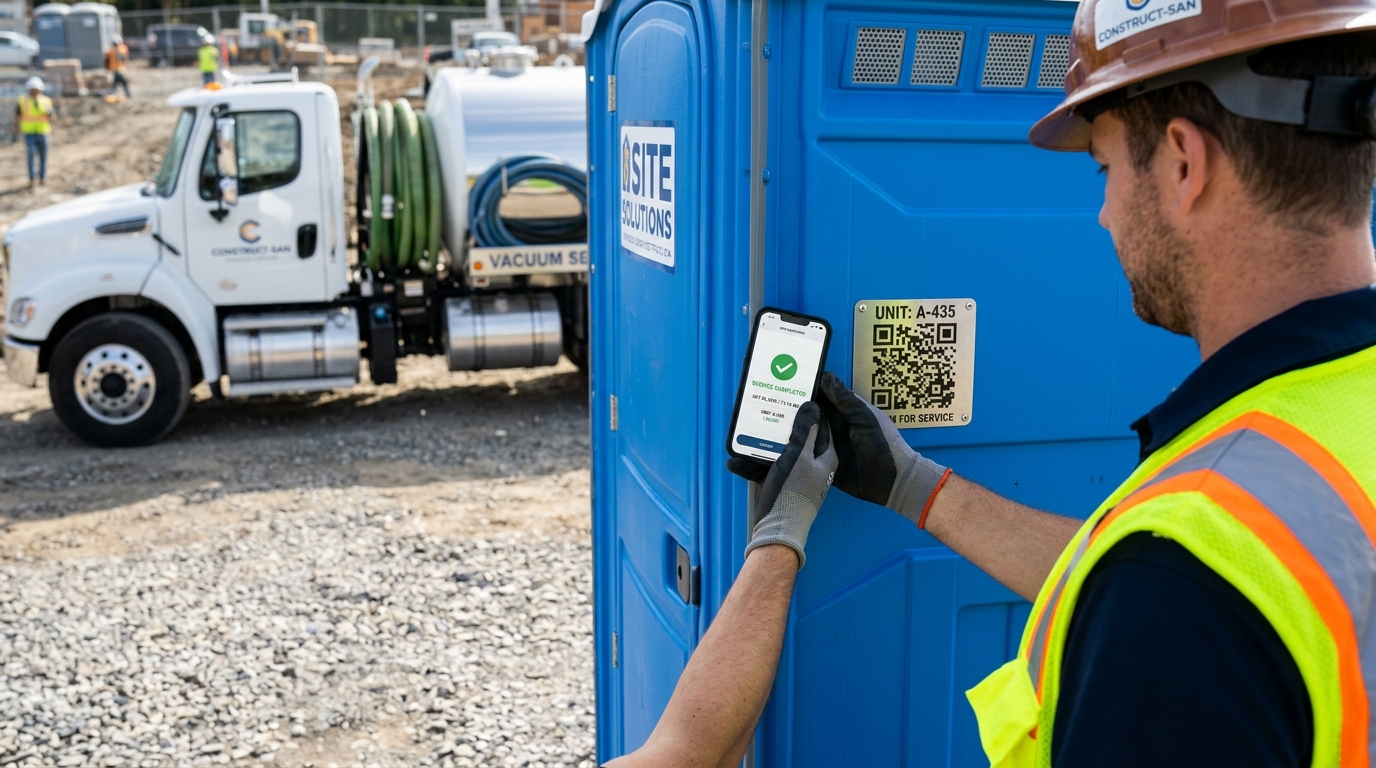
If your portable sanitation business still relies on grease pencil stickers inside toilet doors, paper route clipboards, or memory to prove when a unit was last pumped, your company is hemorrhaging both time and cash. In commercial construction and event rentals, "if it isn't documented digitally, it didn't happen."
Between disputed contractor invoices, missed maintenance cycles, and chaotic spreadsheets, portable restroom operators lose an average of $12,000 to $18,000 annually per service truck. Switching to digital service history tracking eliminates these losses while accelerating cash flow and increasing client retention.
In this guide, we break down exactly how modern sanitation fleets track unit service history digitally, the core technologies involved (QR codes, GPS photo watermarks, and cloud ledgers), and how you can implement this across your fleet in less than 48 hours without slowing down your drivers.
A general contractor disputed a 60-day billing cycle on a high-rise construction jobsite, withholding $8,400 across 6 portable restrooms. The GC's site superintendent claimed the units hadn't been pumped in 3 weeks because the interior service stickers were illegible from pressure washer overspray. Without a digital audit trail, the operator had to compromise on a $4,200 write-off.
Why Traditional Paper Stickers & Clipboards Fail
For decades, portable restroom service history lived on a 4x6-inch yellow adhesive decal slapped behind the door. While simple, paper stickers present fatal operational flaws in modern field service:
- Physical Deterioration: Pressure washers, hot summer humidity, chemical splash-back, and UV rays quickly wash out grease pencil and permanent marker dates.
- Zero Central Visibility: Dispatchers and billing specialists back in the office have no clue when unit #PT-104 was last pumped until the driver turns in a crumpled paper sheet days later.
- Vandalism & Fraud: Anyone with a marker or scraper can alter a sticker date, creating instant liability during municipal health inspections or OSHA audits.
- Unverifiable Proof: A written date proves a pen touched the sticker; it doesn't prove the tank was evacuated, recharged with deodorizer, or scrubbed.
The 4 Pillars of Digital Porta Potty Service Tracking
Modern digital tracking does not require expensive custom hardware or cumbersome tablets. A dedicated field application like PortaPotty Log running on standard Android phones combines four essential components:
📱 1. Weatherproof QR Codes
Every toilet gets a rugged vinyl QR code decal linked to its unique Unit ID. A 0.2-second camera scan pulls up the unit's complete maintenance history instantly.
📍 2. GPS & Timestamp Stamping
Captures hardware-verified latitude, longitude, and minute-accurate timestamps. Proves physical technician presence directly beside the unit.
📸 3. Photographic Audit Trail
Technicians snap a 5-second photo of the clean bowl, fresh blue biocide chemical, and restocked paper rolls with indelible cryptographic watermarks.
☁️ 4. Automated Cloud Summaries
Records sync seamlessly to cloud ledgers, enabling dispatchers to generate weekly audit reports and commercial batch invoices with one tap.
Step-by-Step: How to Implement Digital Tracking in 48 Hours
Step 1: Assign Durable QR Identifiers to Your Fleet
Stop writing unit numbers with spray paint. Print or order industrial-grade, UV-laminated vinyl QR stickers (or metal barcode tags). Affix the barcode on the exterior side panel near the door or directly above the handle where the route driver can scan it instantly without entering the cab first.
Step 2: Equip Route Drivers with an Offline-First Mobile App
Cellular dead zones are common on rural event sites, agricultural fields, and subterranean construction zones. Ensure your technicians use an offline-first Android app. The app stores all scans, GPS pings, and photo logs locally in an SQLite database, syncing automatically once the vehicle regains network signal.
Step 3: Establish the 30-Second Standard Operating Procedure (SOP)
Fleet owners often worry that mobile apps slow drivers down. When standardized properly, digital logging actually speeds up stops by replacing clipboard writing:
- Arrive & Scan: Point the phone at the unit QR code (0.2 seconds).
- One-Tap Checklist: Tap four buttons: [Tank Pumped], [Deodorizer Added], [Paper Restocked], [Interior Washed].
- Snap Photo: Quick photo showing clean interior and charged chemical.
- Log & Move: The app tags the GPS coordinates and timestamp, closing the stop in under 30 seconds.
Step 4: Dispatch Automated Service Summaries to Clients
Instead of waiting for clients to dispute an invoice 30 days later, send automated Proof of Service Summaries. Commercial site superintendents receive a weekly email detailing every visit with GPS timestamps and clean photos—completely separate from financial billing.
Comparison: Traditional Methods vs. PortaPotty Log
| Feature / Capability | Door Stickers | Excel / Paper Logs | PortaPotty Log App |
|---|---|---|---|
| Verification Speed per Stop | 45 seconds (manual writing) | 60+ seconds (clipboard notes) | < 30 seconds (1-tap scan) |
| GPS Location Verification | ✗ None | ✗ None | ✓ 3-meter satellite accuracy |
| Photo Proof with Watermark | ✗ None | ✗ Messy camera rolls | ✓ Burned-in date, time & Unit ID |
| Offline-First Functionality | ✓ Physical only | ✗ Sync conflicts | ✓ Full offline SQLite sync |
| Audit Trail for Billing Disputes | ✗ Inadmissible / Damaged | ✗ Easily contested | ✓ 100% indisputable PDF slips |
| Automated Client Summaries | ✗ Impossible | ✗ Hours of manual typing | ✓ Automated scheduled dispatch |
Key Data Points to Capture During Every Digital Service
When tracking portable sanitation maintenance digitally, your database should record these critical metrics for every single servicing event:
- Unit ID & Model: Standard standard, ADA compliant, handwash station, luxury trailer.
- Exact Jobsite & Client Name: Links the servicing history directly to the contractor account.
- Satellite Coordinates: Precise latitude and longitude captured at the moment of completion.
- Technician Attribution: Identifies which driver executed the pump-out for quality assurance.
- Consumables Restocked: Rolls of toilet paper, ounces of hand sanitizer, water reservoir refill.
- Damage / Defect Flags: Broken door springs, graffiti, tipped unit, or cracked holding tank for rapid repair dispatch.
Track Your Entire Fleet Digitally in 30 Seconds
Switch to PortaPotty Log and experience seamless QR code scanning, tamper-proof GPS photo logs, and automated client service summaries on Android.
Download Free on Google Play →Frequently Asked Questions (FAQ)
Conclusion: Modernize Your Fleet and Protect Your Revenue
Tracking portable toilet service history digitally is no longer just a "nice-to-have" luxury—it is an operational shield that protects your business from billing disputes, improves driver accountability, and wins larger commercial contracts.
By replacing easily destroyed door stickers with durable QR codes and GPS-verified photo slips, you give both your office staff and your clients total transparency. Start tracking your fleet digitally today with PortaPotty Log.